
Live scoring and the leaderboard
Scores from each group's phone, a leaderboard guests can follow, and a TV board for the clubhouse.
One person in each group enters scores on their phone, and the leaderboard updates as the holes come in. Guests follow it on the event website, and a TV in the clubhouse shows the board with your sponsors rotating through.
Set it up
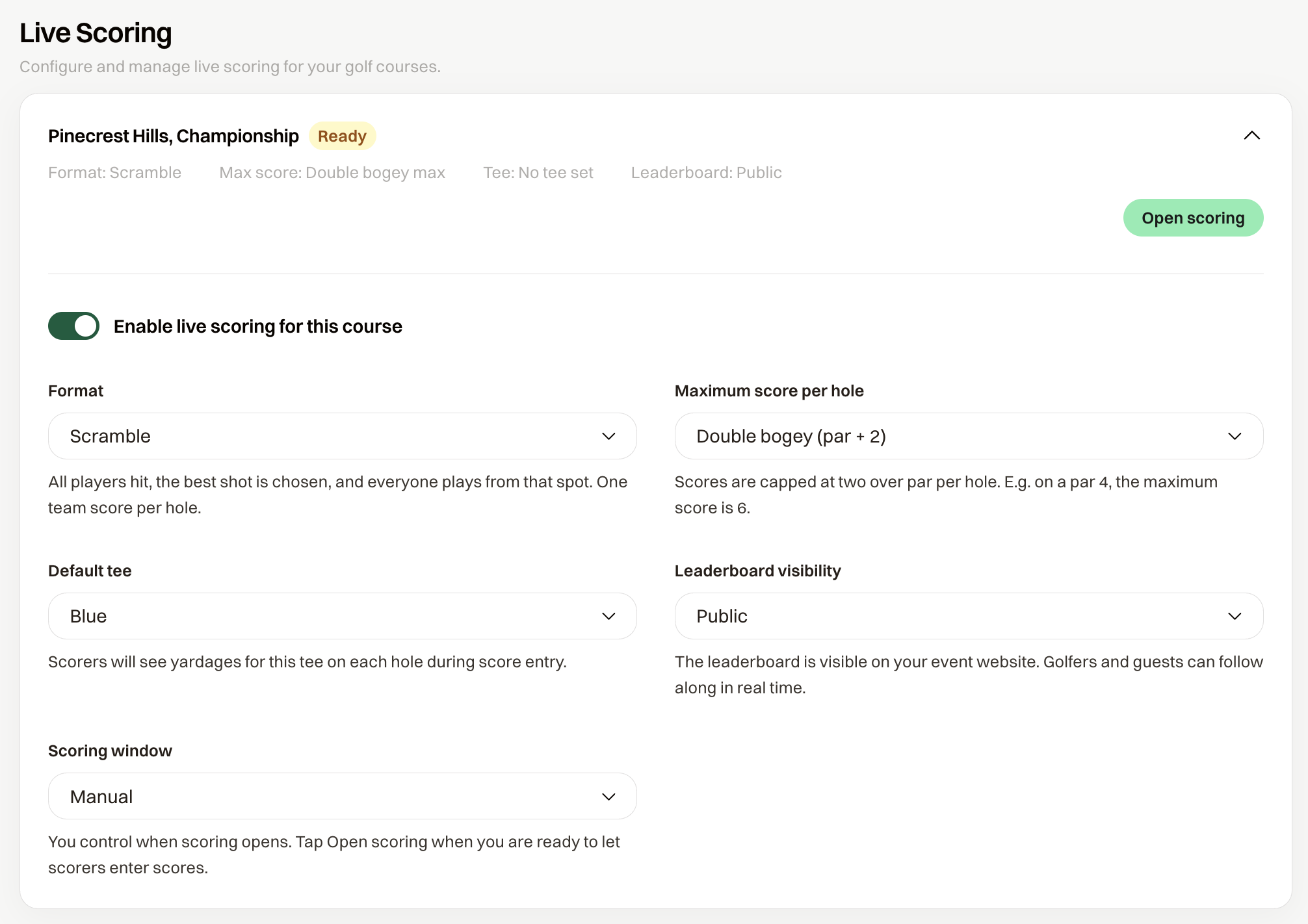
Open Live Scoring, turn on Enable live scoring for this course, and work down the card.
Format. Scramble is one team score per hole. Stroke Play is a score per player.
Maximum score per hole. Set a cap and keep the field moving. Double bogey is the usual choice for a scramble; nobody needs to hole out for a 9. The scorer's phone stops at the cap and records it, and the group picks up and moves on. No limit lets a scorer enter anything, and flags a score well above par. A cap only works on holes that have a par, so import the course first.
Default tee. The tee your golfers are playing. Scorers see that tee's yardage on each hole. It stays empty until course data is imported in Course setup.
Leaderboard visibility. Public puts the board on your event website. Admin only hides it, and guests who open the link see "This leaderboard is not available."
Scoring window. Manual means scoring opens when you choose Open scoring. Scheduled opens it at a time you set. Leave it on Manual and open scoring on the morning of the event: nobody can enter a score until they have their link, so there is nothing to protect by keeping it closed.
Saving the card creates a scoring link for every group.
Send the scorer links
Scorer links lists each group with Copy, and Send scoring links to all participants emails every golfer who has an email address their group's link. Send it the morning of the event, after the tee sheet is final. How they use it is in Enter scores on your phone.
In Practice Mode the send dialog says "Bulk sending is disabled until your event is published." Copy a single link to test with.
During the round
The course reads Ready once scoring is on, Active while scores can be entered, and Finalized once the round is locked. View scores on the card shows you everything as it comes in, including an Admin only board.
After the last group, choose Finalize round. Scores lock and the LIVE mark leaves the public board. Re-open scoring if a correction comes in late.
The leaderboard
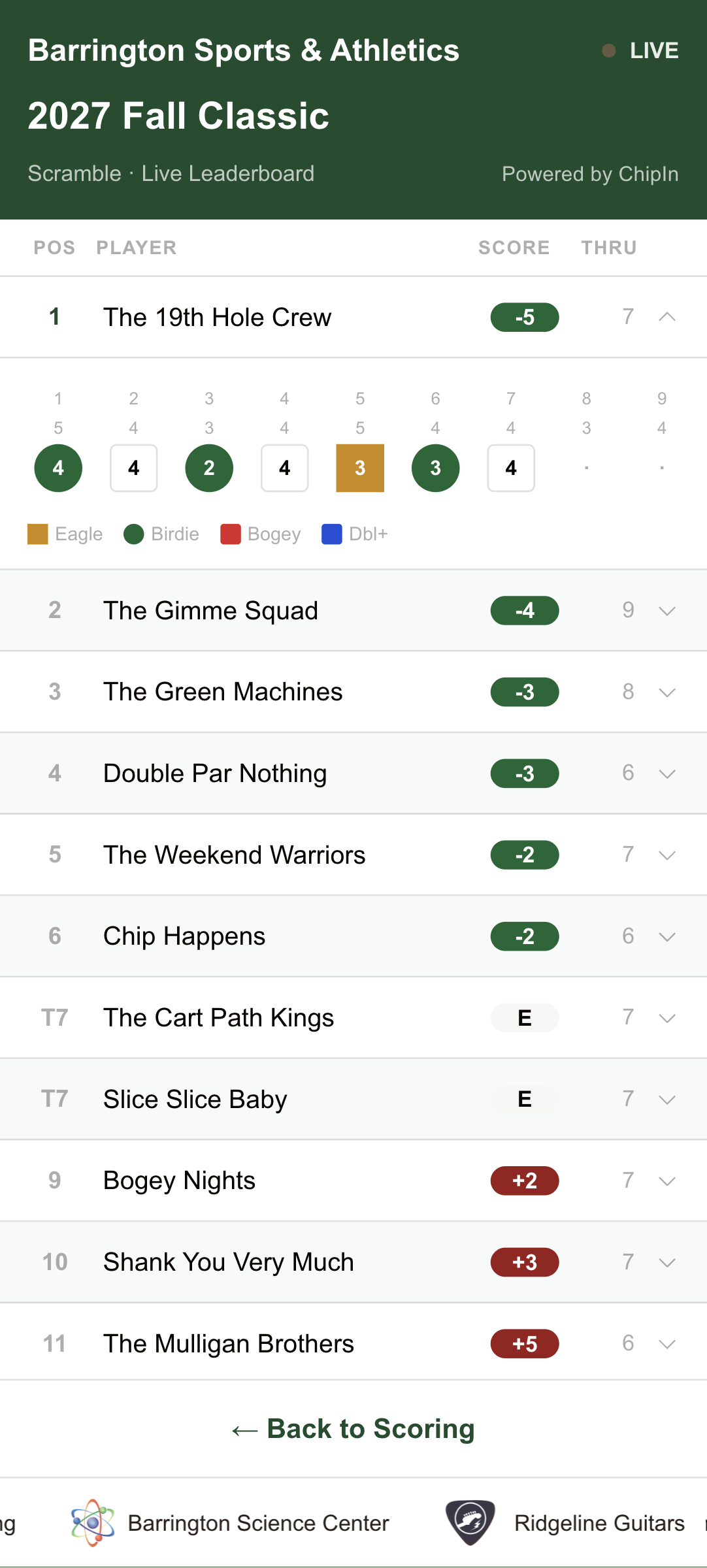
The public board shows rank, team or player, score to par, and Thru: the holes completed, or F when the round is in. Tied teams share a rank, shown as T1. A guest can tap a row to see that team's hole-by-hole scores. Your event sponsors run along the bottom as a ticker.
TV mode
While scoring is active, Leaderboard on the card opens a dialog with two links. Leaderboard is the public page to share with golfers. TV mode is the same board laid out for a display: open it on the laptop plugged into the clubhouse screen, no sign-in needed.
Three settings shape the TV board, and they save from this dialog.
- Sponsor rotation is how long each sponsor stays on screen before the next one fades in, from 5 to 30 seconds. The sponsors are your event sponsors with a logo; hole sponsors are not in the rotation.
- Expand hole scores in TV mode opens every row with its hole-by-hole scores when the board loads. Leave it off for a clean list, turn it on for the dinner when people want to see where the round was won.
- Auto-scroll in TV mode scrolls through the whole field, pauses at the top, and starts again. Turn it off to hold the top of the board.
Common questions
A group entered the wrong score
The group can fix it from their phone. You can also fix any score yourself: View scores on the card opens every group's card, and clicking a hole lets you type the right number. The leaderboard picks it up within a few seconds. Once the round is finalized, Re-open scoring first, fix it, then finalize again.
Can guests see the leaderboard before the round?
Yes, if it is Public. Until the first score comes in it lists the teams at even par. That's one more reason to open scoring the morning of the event: there's nothing to hide, and the board is ready the moment the first group finishes a hole.